







Game Systems
Community > Mail
Mail is a system for sending letters, items, Zenny and more to other characters within Dragon Ball Online.
You can send Mail whether or not the recipient is online, and the sender can send text, items and Zenny individually or all together.
* If your Capsule Kit is full, rewards from TMQ (Time Machine Quest) and the World Martial Arts Tournament can be received by Mail.
Opening the Mailbox
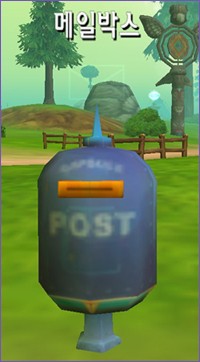
To send and receive Mail, click one of the Mailboxes placed around the world.
* You must be within 5 m to click it.
Clicking a Mailbox opens the Mailbox window on screen.
The Mail list only shows up to 30 messages; if you have more than that, delete older Mail to see the rest.
* Only received Mail is stored in the Mailbox; sent Mail is not saved.
There is a Mailbox icon in the character status window at the top left of the game screen.
This button opens the Mail window and also serves as a new-Mail alert: the Mailbox icon flashes when Mail arrives, and stops flashing once all newly received Mail has been read.
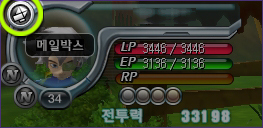
* Without a [Mailbox Access Chip] or [Matter Transfer Chip], the Mailbox cannot be opened with this icon.
Sending Mail
Mail has a basic function for sending text only, and additional functions for sending items and sending or requesting Zenny.
Sending Mail costs a postage fee, and using the additional functions costs extra.
| Type | Fee | Function | Limit |
|---|---|---|---|
| Basic | 10 Zenny | Send text | 128 characters |
| Additional | 20 Zenny | Send item | 1 slot |
| Request / send Zenny | Up to 100,000 Zenny |
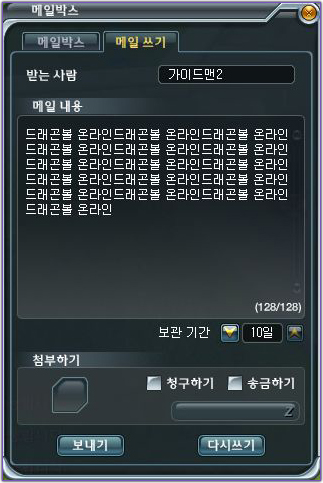
 Mail content
- This is where you type your message. As you type, the character counter at the bottom right of the text field goes up with the number of characters, and once it reaches the maximum of 128 characters no more text can be entered.
 Storage period
- The storage period is the time after which, if the recipient has not read the Mail, it is returned to the sender. It can be set from a minimum of 1 day to a maximum of 10 days.
 Attachments
- Only one item can be attached per Mail. Stackable items can be attached as a full stack, or you can split the stack in your inventory first and attach only the quantity you want.
 Request and Send Zenny
- Ticking the Request or Send checkbox activates the Zenny field, and you can request or send up to 100,000 Zenny.
Receiving Mail
Mail exchanged between players and system Mail can be viewed separately.
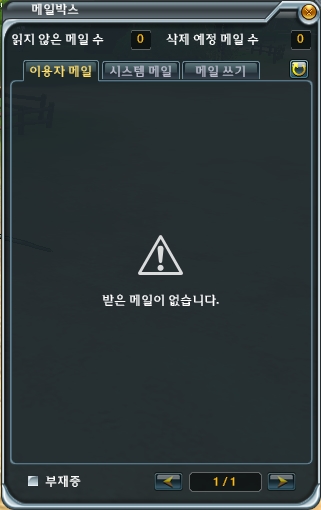
Received Mail is kept in the Mailbox. Read Mail shows the time left until it is deleted from the server, and unread Mail shows the time left until it is returned to the sender.
Lock
- If you lock a Mail in your Mailbox, its storage period stops counting down, and it is kept even when the storage period reaches 0.
* Depending on the Mail grade, Manager-grade Mail is locked from the start.
| Grade | Description |
|---|---|
| Normal | Mail sent by regular players |
| Manager | Mail sent by GM characters Mail sent by the system (event prizes, quest rewards, etc.) |
Away
- Ticking the [Away] checkbox in the Mailbox stops you from receiving Mail. The Mailbox of a character who has not logged in for 30 days or more is automatically set to Away.
* Even while Away, Manager-grade Mail and returned Mail are still received.
Collecting Attached Items and Zenny
Collecting an item with no requested payment
- Click the [Take] button to move the attached item straight into your Capsule Kit. As soon as you collect the item, a reply is automatically sent to the sender.
Collecting an item with a requested payment
- If payment has been requested, clicking the [Take] button opens a confirmation window asking you to pay the requested Zenny and collect the item; click [OK] and the requested amount of Zenny is deducted.
- As soon as you collect the item, a reply is automatically sent to the sender with the requested Zenny attached.
When only Zenny is requested, with no item attached
- A [Pay] button is shown instead of the [Take] button. Clicking it opens a confirmation window for the requested amount; click [OK] and the requested amount of Zenny is deducted.
* When collecting an item with a requested payment, if you don't have enough Zenny to cover the request, or not enough free space in your Capsule Kit for the item, the item is not collected and a message explaining why is displayed.
| Icon |  |  |  |  |
|---|---|---|---|---|
| Status | Unread Mail | Read Mail | Unread Mail (Zenny or item attached) | Read Mail (Zenny or item attached) |
Additional Mail Functions
Reply
- Clicking the [Reply] button at the bottom of the Read Mail window closes the Mail you were reading and takes you to the Write Mail window.
- After clicking [Reply] and moving to the Write Mail window, the recipient is filled in automatically and the cursor is placed in the message field.
Return
- Even before the storage period has expired, you can send a Mail back to its sender with the [Return] button.
Mail cannot be returned once its attached item or Zenny has been collected, and Mail that has already been returned once cannot be returned again.
Deleting Mail
- If your Mailbox is running out of space, you can delete unneeded Mail to free up space.
- Mail with an attached item or Zenny cannot be deleted; it can be deleted after the attached item or Zenny has been collected.