








Game Systems
Enhancement
Item Enhancement Overview
 What is item enhancement?
Weapons and armor have 16 grades in total, from '0' to '+15'. Raising this grade is called 'item enhancement'.
Enhancement normally goes up one grade at a time, but depending on the type of Enhancement Stone, the grade can rise by up to 3 at once.
 How to enhance items
You can enhance items through the 'Enhancement Expert' NPC in each town.
Enhancing items requires Enhancement Stones, as listed below.
Weapon Enhancement Stone
Raises a weapon's enhancement grade by +1.
Advanced Weapon Enhancement Stone
Raises a weapon's enhancement grade by a random +1 to +3.
Armor Enhancement Stone
Raises an armor piece's enhancement grade by +1.
Advanced Armor Enhancement Stone
Raises an armor piece's enhancement grade by a random +1 to +3.
Downgrade Stone
Lowers a weapon's or armor piece's enhancement grade by 1.
Each Enhancement Stone has its own level, and you must use the stone grade that matches the item's required level.
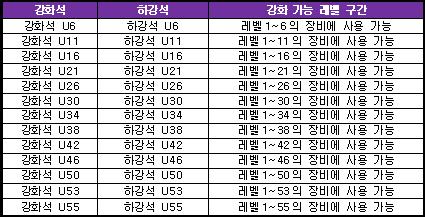
1. Visit the Enhancement Expert NPC and select 'Item Enhancement'.

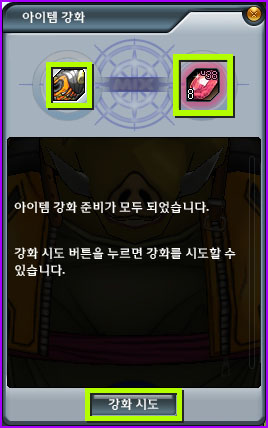
2. Place the item you want to enhance and an Enhancement Stone, then press the Enhance button.
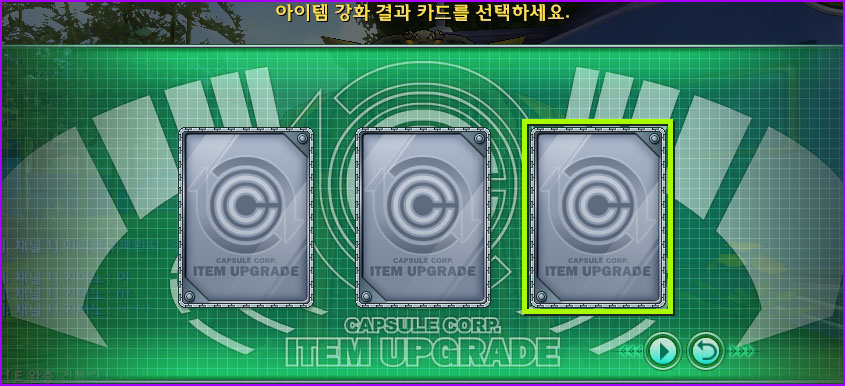
3. Choose one of the three 'Item Enhancement Result Cards'.
4. Oh no! Unfortunately the enhancement [Failed]. But the item was not destroyed.
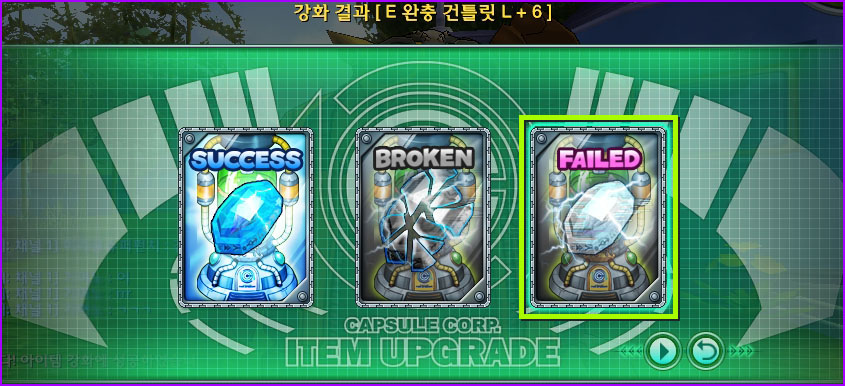
 Enhancement success / failure / destruction
The Enhancement Stone used is consumed regardless of success, failure or destruction.
Weapon enhancement cannot fail or destroy the item up to grade +6.
Armor enhancement cannot fail or destroy the item up to grade +4.
- Success: The grade goes up and bonus stats are added.
- Failure: Nothing happens to the item.
- Destruction: The destroyed item disappears.